
Sheet metal takeoff software can help HVAC and mechanical contractors move faster from ductwork drawings to quote-ready material lists.
But not every tool fits the way sheet metal contractors actually estimate.
A useful system should do more than create measurements. It should help estimators review ductwork plans, identify fittings, organize quantities, apply pricing, and prepare a quote that can be sent professionally.
For contractors working under tight deadlines, the right takeoff software can reduce manual counting and make the estimating process easier to manage.
Why Sheet Metal Contractors Need Better Takeoff Workflows
Sheet metal estimating is detail-heavy.
A single ductwork project can include round ducts, rectangular ducts, elbows, transitions, reducers, dampers, taps, liners, and other fittings. Each item affects material cost, fabrication planning, labor, and quote accuracy.
When the takeoff is done manually, estimators often spend hours reviewing PDFs and entering quantities into spreadsheets.
That process may work for a few jobs, but it becomes harder when bid volume grows.
Contractors need workflows that help them move faster without losing control over the details.
What Good Sheet Metal Takeoff Software Should Do
Good sheet metal takeoff software should support the real estimating process.
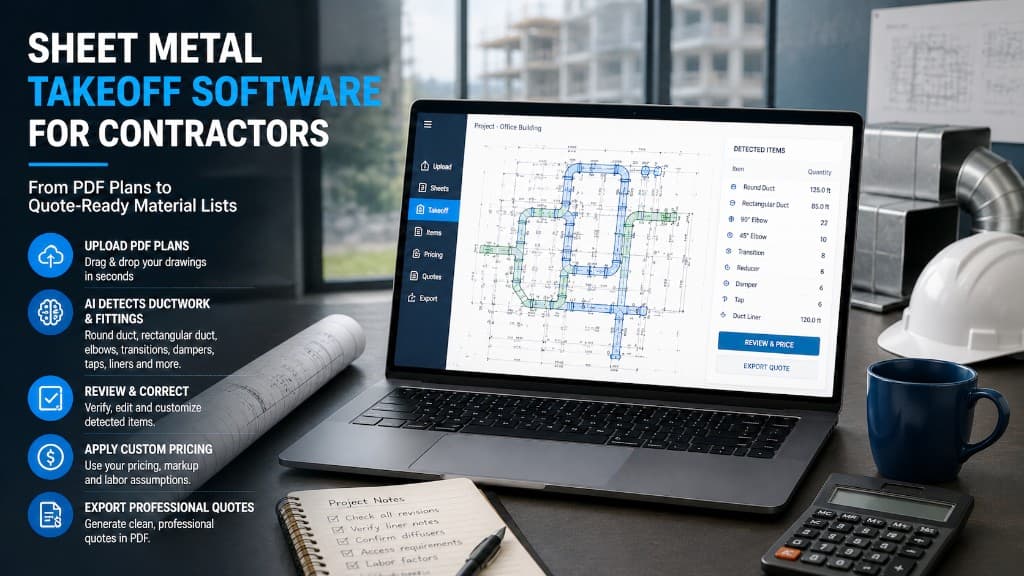
It should allow contractors to upload PDF drawings, identify ductwork items, review quantities, apply pricing, and prepare a quote.
The software should not force contractors into a generic workflow that does not match how they price jobs.
Every contractor has different suppliers, labor assumptions, fabrication methods, and markup strategies. That is why custom pricing is important.
The estimator should always be able to review and correct the takeoff before sending the final quote.
AI-Powered Detection Can Save Time
AI-powered takeoff software can help by detecting visible ductwork items and fittings from uploaded plans.
This can reduce the time spent on first-pass counting. Instead of starting from a blank spreadsheet, the estimator starts with an organized list that can be reviewed and corrected.
That is especially useful when dealing with tight bid deadlines or multiple quote requests at the same time.
AI does not remove the estimator from the process. It gives the estimator a faster starting point.
Look for Review and Correction Tools
Review is one of the most important parts of any estimating workflow.
No contractor should send a quote without checking the takeoff. Drawings may be unclear, incomplete, or revised. Some symbols may require interpretation. Some scope items may depend on notes or project-specific conditions.
Good takeoff software should make review easy.
The estimator should be able to inspect detected items, correct quantities, adjust pricing, and make sure the final quote reflects the actual project scope.
Custom Pricing Matters
Pricing is where many estimating systems fall short.
Sheet metal contractors do not all price the same way. Material costs, supplier agreements, shop practices, labor assumptions, and markup vary widely.
If software does not support custom pricing, the estimator may still need to move everything back into a spreadsheet.
That slows the workflow down.
A better system lets contractors apply their own pricing after the takeoff is reviewed.
Professional Quote Export
The final step is sending the quote.
A takeoff tool is more useful when it helps contractors turn reviewed quantities and pricing into a professional quote document.
A clear quote can reduce follow-up questions and help customers understand what is included.
Sheetmetal AI supports this workflow by helping contractors upload ductwork plans, detect items and fittings, review results, apply custom pricing, and export professional quotation PDFs.
Practical Example
A sheet metal contractor receives a PDF plan set for a commercial HVAC project. The estimator needs to prepare pricing quickly, but the drawings include multiple ductwork areas and several types of fittings.
With a manual workflow, the estimator may spend hours counting and organizing before pricing begins.
With Sheetmetal AI, the contractor can upload the plans, use AI detection to create a first-pass takeoff, review and correct the detected items, apply pricing, and export a professional quote.
The estimator still controls the final result, but the repetitive setup work is reduced.
Conclusion
Sheet metal takeoff software should help contractors work faster while keeping estimators in control.
The right tool should support PDF plan upload, ductwork item detection, review and correction, custom pricing, and professional quote export.
For HVAC and sheet metal contractors, AI-powered tools like Sheetmetal AI can reduce manual counting, organize material lists faster, and support a more consistent quote preparation process.
If your team is still building every ductwork takeoff manually from scratch, it may be time to consider a more efficient workflow.
FAQ
What is sheet metal takeoff software?
Sheet metal takeoff software helps contractors identify, count, organize, and price ductwork and sheet metal items from project drawings.
Why is AI useful in sheet metal takeoff?
AI can help detect visible ductwork components and fittings from PDF plans, reducing the time spent on manual first-pass counting.
Should estimators still review AI takeoffs?
Yes. Estimators should always review, correct, and approve takeoffs before sending quotes.
What features matter most?
Important features include PDF upload, ductwork item detection, review tools, custom pricing, and quote export.
How does Sheetmetal AI help?
Sheetmetal AI helps contractors upload plans, detect ductwork items, create material lists, apply custom pricing, and export professional quotation PDFs.
Try Sheetmetal AI for your sheet metal takeoff workflow.
Turn ductwork plans into quote-ready material lists faster.
Use AI to support your estimating team without losing control.