
AMERICAN-BUILT HVAC TAKEOFF & ESTIMATING SOFTWARE
HVAC Takeoffs.
Faster Quotes.
Built in America by HVAC contractors and industry veterans. Turn mechanical PDFs into reviewed ductwork takeoffs and priced quotes using your shop’s rates. Connect SheetMetalAI to Claude to ask about your projects, finished takeoffs, quotes, and uploaded documents.
Credit card required · Choose monthly or yearly
SHEETMETALAI / IN THE WORKSPACE
Real plan · Actual software
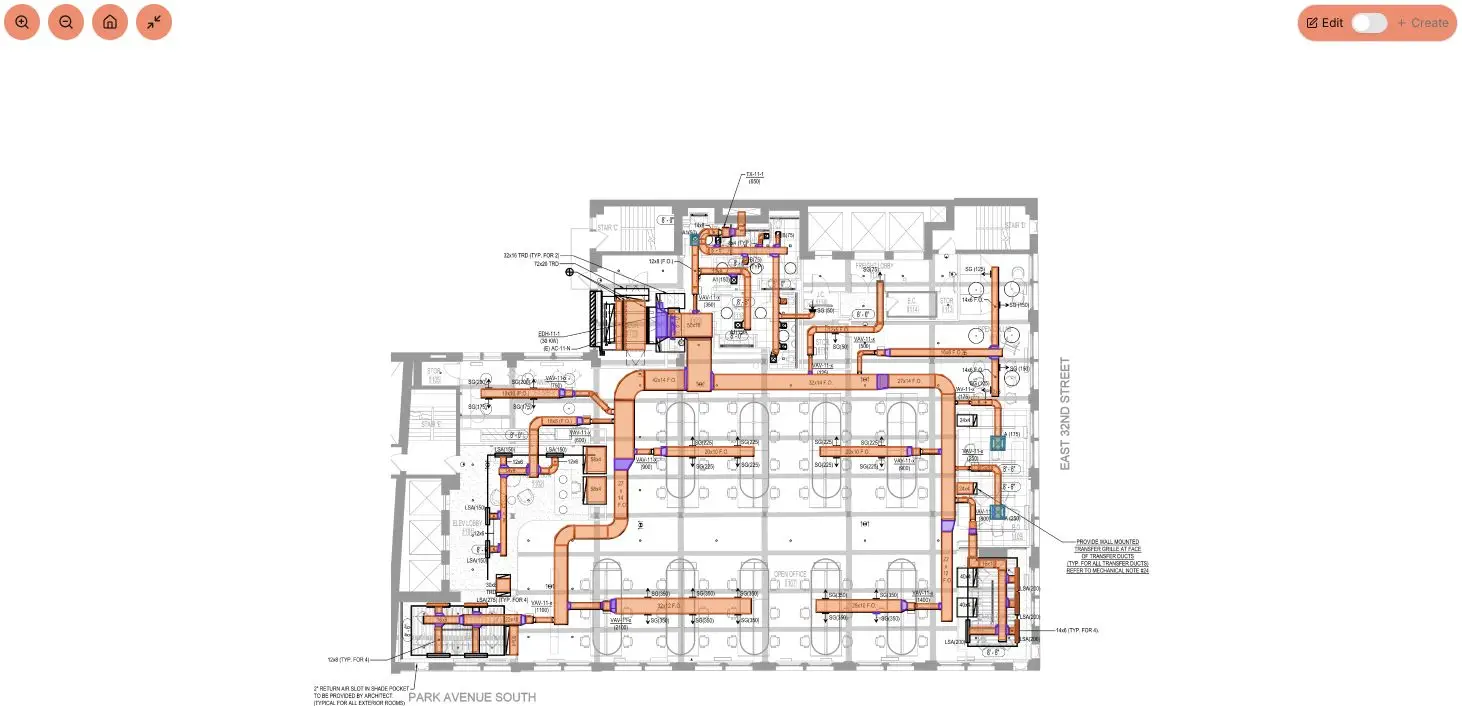
CHECK THE TAKEOFF
See what AI finds.
USE YOUR RATES
Keep pricing yours.
EXPORT A PDF
Move the bid forward.
CONNECT SHEETMETALAI TO

Ask Claude About
Your Takeoffs.
Connect your SheetMetalAI account to Claude, then ask questions in plain language. Get answers from your latest project data, with document page references and links back to the app.
See How the Integration Works →01 · CONNECT
Your Projects in Claude
Sign in and approve access to your own SheetMetalAI projects. The connector is read-only and uses your Claude plan without using SheetMetalAI credits.
02 · ASK
Find the Details
Ask about finished takeoff quantities, quote totals, project status, and uploaded PDFs. Ask Claude to list liner, gauge, wrap, and sealing requirements by page.
03 · REVIEW
Make Changes in the App
Check Claude’s answers against the original documents. Follow links back to SheetMetalAI to review your takeoff, adjust your rates, and prepare the bid.
ONE REAL PLAN. EVERY STAGE IN VIEW.
See what goes into your next quote.
Follow the same mechanical drawing from PDF to sample quote. These are real screens from SheetMetalAI, with your review built into the process.
1
THE ORIGINAL DRAWING

Start With Your PDF
Choose the mechanical sheet and scope you want to quote. This example follows one eleventh-floor ductwork plan.
2
THE AI-ASSISTED FIRST PASS
See the Detected Ductwork
Follow highlighted runs and fittings. Check the drawing scale and review what belongs in the takeoff.
3
YOUR REVIEW & SHOP RATES

Review the Details
Inspect dimensions and quantities, then check liner, wrap, specifications, and the rates saved for the job.
4
PRELIMINARY DEMO ESTIMATE

Export a Priced Quote
Bring components and installation labor into a PDF. Review the final scope and pricing before sending it.
Sample project: M-501.00 · Mechanical 11th Floor Ductwork Plan
The displayed estimate is preliminary, not a completed bid. Confirm scope, dimensions, specifications and rates before customer use. Select an image to inspect it.
BUILT AROUND THE WORK YOU BID
The Right Workflow for Your Business.
HVAC Estimating Software for Contractors
When you run HVAC jobs, estimating competes with everything else on your schedule. SheetMetalAI helps you move from a mechanical PDF to a reviewed ductwork takeoff and a priced quote using your own material and labor rates.
Explore →Sheet Metal Estimating Software for Duct Shops
A ductwork estimate needs more than a count of lines. SheetMetalAI helps your shop review the materials behind the drawing, apply your pricing rules, and turn the takeoff into a priced PDF quote.
Explore →HVAC Takeoff Software for Independent Estimators
When you handle the takeoff and the pricing, every handoff lands on your desk. SheetMetalAI gives you an AI-assisted first pass on ductwork so you can focus on reviewing scope, quantities, and the numbers behind the bid.
Explore →From Your Plan to Your Quote
Five simple steps.
You’re in charge.
Start with your drawings and specifications. Finish with a priced quote you’ve checked and made your own.
Upload Plans & Specs
Bring drawings and specs. Start with the same scope.

Let AI Find The Ductwork
Find ducts & fittings. Check sizes & lengths.

Check The Takeoff
Check takeoff and specs. Resolve details before pricing.

Apply Your Shop Rates
Set your shop’s rates. Build a priced quote.

Export Your Quote
Export a PDF quote. Get your next bid out.

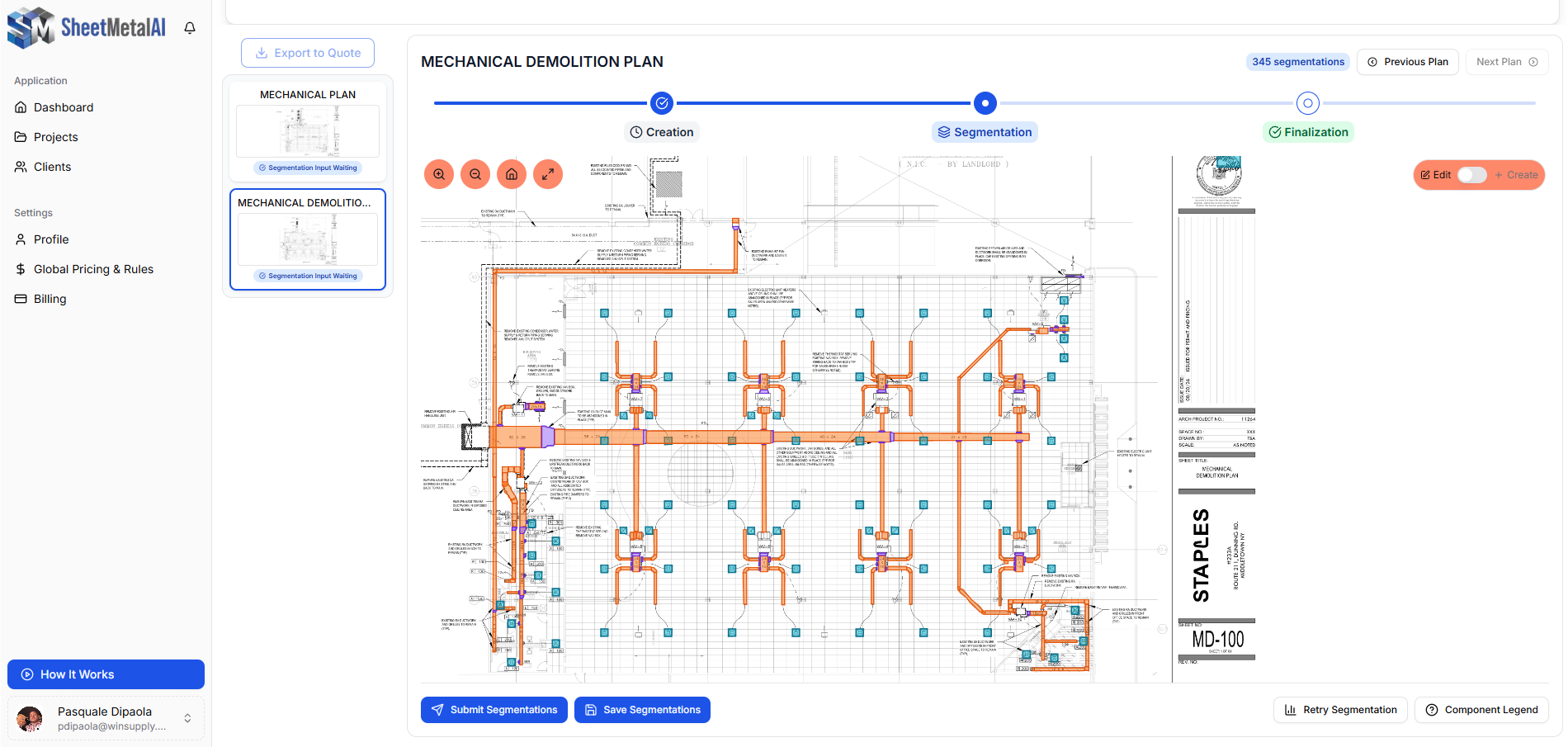
Take a quick look
See it work on a real plan.
Watch the short walkthrough to see how a mechanical drawing becomes a takeoff you can check, price, and quote.
Built for the way your shop works
Good tools. Less busywork.
Keep drawings, specification requirements, material quantities, and your shop’s pricing connected from upload to the final quote.

Start with the drawing.
Identify ductwork, fittings, and dimensions from the plan so you can focus on reviewing the result.

Know what the job needs.
See sheet metal in pounds, liner in square feet, spiral footage, and flex box counts.

Keep the bid moving.
Turn your priced takeoff into a PDF quote that’s ready to share.

Price it your way.
Bring your material rates, labor assumptions, and shop pricing into the estimating workflow.

Keep the team in view.
Follow project activity and estimating workload from one shared workspace.

Put your rules to work.
Apply gauge tables and shop-specific rules consistently across your takeoffs.
Find your fit
A plan that fits your workload.
Choose how many plans you need each month. Every option starts with a 3-day trial.
For a lighter workload
Field Starter
For independent estimators.
$99
/ month
Billed monthly.
✓ Approx. 15 plans / month
✓ Custom pricing tables
✓ Team collaboration
✓ PDF quote export
3 days free · Credit card required
Popular with teams
Pro Estimator
For growing estimating teams.
$149
/ month
Billed monthly.
✓ Approx. 25 plans / month
✓ Custom pricing tables
✓ Team collaboration
✓ PDF quote export
3 days free · Credit card required
For a busy shop
Enterprise Edge
For shops with a full bid pipeline.
$199
/ month
Billed monthly.
✓ Approx. 40 plans / month
✓ Custom pricing tables
✓ Team collaboration
✓ PDF quote export
3 days free · Credit card required
Compare monthly & yearly plans →
Capacities are approximate and based on distinct PDF plans. Repeat runs reduce available capacity.
What does SheetMetalAI do?
SheetMetalAI helps HVAC contractors and sheet metal estimators turn mechanical PDFs into reviewed takeoffs and priced PDF quotes. Its takeoff engine identifies ductwork and fittings and organizes quantities for your rates. The optional Claude connector lets you ask about your project data inside Claude; changes are made in SheetMetalAI.
Can I check and edit the AI results?
Yes. The plan workspace displays color-coded detections for review. You can refine the segmentation and save the results before finalizing your takeoff. Always review the scope, quantities, and pricing before submitting a bid.
Can I use my own pricing?
Yes. Custom pricing tables let you use your shop’s rates. Review your material prices and estimating assumptions so the output reflects the way you quote work.
How does the free trial work?
Each plan starts with a 3-day free trial. A credit card is required. Review the subscription terms and billing details shown during sign-up before starting your trial.
Put it to work
Your next bid starts here.
Try SheetMetalAI with one of your own plans and see how it fits your shop.
Credit card required.