
How It Works
From the plan
to your next bid.
Bring your mechanical PDF and your shop’s rates. SheetMetalAI helps identify the ductwork, organize the quantities, and turn your reviewed takeoff into a priced PDF quote. Follow the five steps below to see what the software does, what you should check, and what you’ll have when you’re ready to bid.
See the process in less than a minute.
Your Plan. Your Rates. Your Final Call.
Five Steps, With You in Control.
Here’s how a mechanical drawing becomes a quote you can stand behind. Follow the process from upload through export, with clear checkpoints along the way.

Upload Your Plan
Start with the mechanical PDF you already use for estimating. The drawing is the starting point for the takeoff, so begin with the right sheet and revision for the work you’re quoting.
Choose the Right Plan
Use the mechanical drawing that matches your bid scope. Keep related schedules, notes, and addenda nearby while you review.
Check the Drawing Quality
Make sure the ductwork, dimensions, and labels are readable. Clear source information makes the results easier to inspect.
Know What You’re Including
Decide which work belongs in your estimate before you start. The drawing and your scope should tell the same story.
What You’ll Have
Your PDF is the starting point for AI-assisted ductwork identification. You keep the original job information in view as you work toward a quote.
A Tip From the Shop
For your first run, pick a plan you’ve estimated before. Familiar ductwork gives you a useful reference for checking the results.

Let AI Find the Ductwork
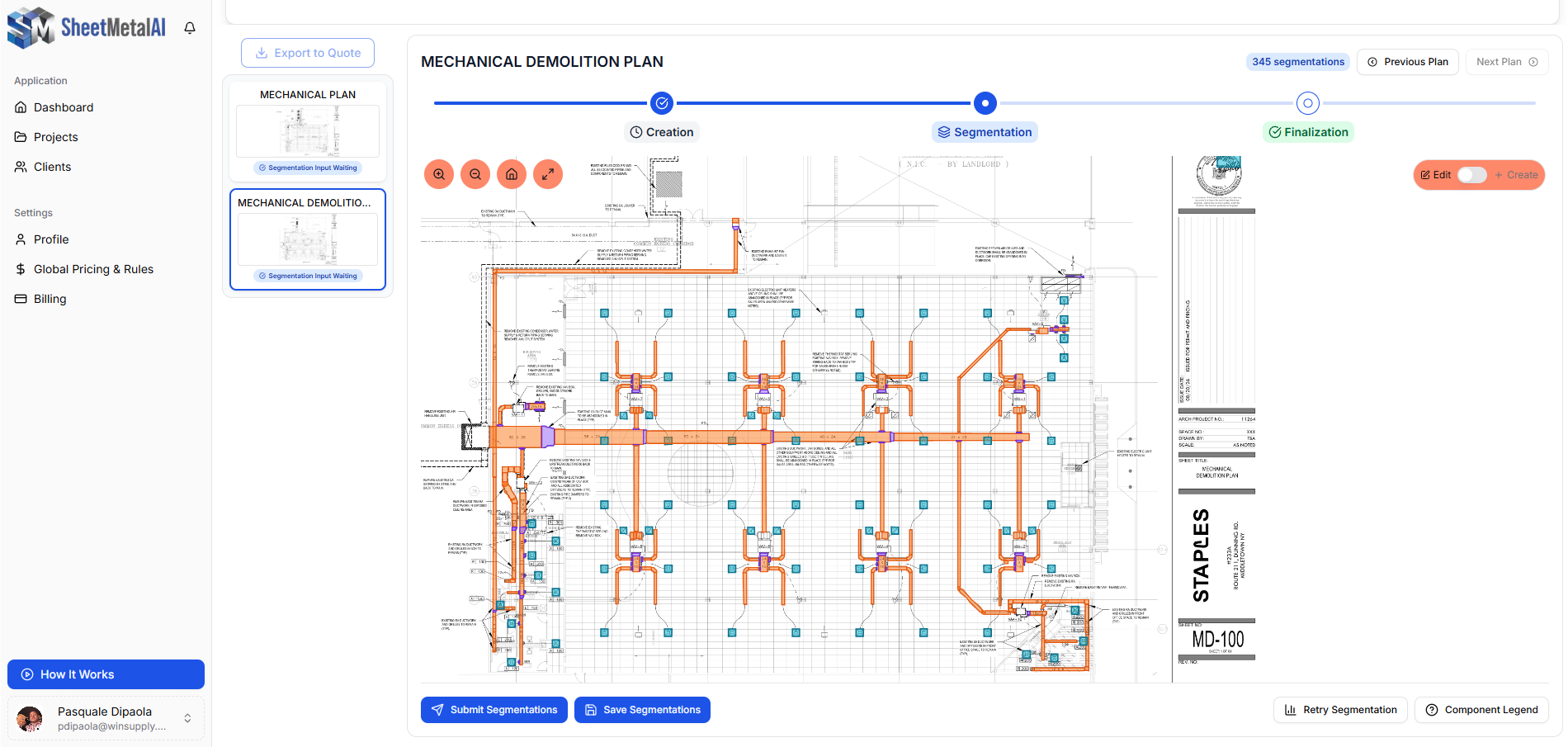
SheetMetalAI reads the mechanical drawing to identify duct runs, fittings, sizes, and lengths. It gives you a first pass at the takeoff, with detections you can inspect against the plan.
Identify Runs and Fittings
Let the engine locate the ductwork geometry that would otherwise need to be worked through by hand.
Bring Dimensions Into View
Review the sizes and lengths associated with the detected ductwork as part of the estimating workflow.
See the Results on the Plan
Use the color-coded highlights to understand what the software has picked up before you move into a detailed review.
What You’ll Have
A visible first pass at the ductwork, ready for your review. The AI helps get the counting started; the next step is checking it against the job.
A Tip From the Shop
Give congested areas, closely spaced lines, and unusual layouts a closer look. They deserve the same care they would in a manual takeoff.

Check the Takeoff
Open the plan workspace and inspect the highlighted ductwork. Refine the detections where needed, then save your results before finalizing. This is where your experience with the job becomes part of the estimate.
Follow the Connections
Look through runs, branches, fittings, and transitions. Compare what is highlighted with what is actually shown on the drawing.
Review Sizes and Lengths
Check the detected dimensions and quantities against the plan, especially where the drawing is crowded or difficult to read.
Make Adjustments and Save
Use the review tools to refine the takeoff. Save the reviewed results so you’re working from a checked starting point when you price.
What You’ll Have
A takeoff you have inspected and refined, ready to be priced with your shop’s rates.
A Tip From the Shop
Keep specifications and scope notes beside the plan. The highlighted geometry is only one part of deciding what belongs in your bid.

Apply Your Shop Rates
Turn the reviewed material quantities into an estimate using your own pricing. SheetMetalAI brings your custom pricing tables, labor assumptions, and shop rules into the workflow so the quote reflects how your business prices work.
Review the Material Quantities
Check sheet metal in pounds, liner in square feet, spiral footage, and flex box counts against the work you are including.
Use the Rates Your Shop Knows
Apply your material prices and estimating assumptions instead of building the bid around somebody else’s numbers.
Check the Price Against the Scope
Review quantities, units, and rates together. Make sure the priced work matches the materials and labor you intend to carry.
What You’ll Have
A priced estimate built from your reviewed takeoff and your shop’s numbers, ready for a final check.
A Tip From the Shop
Review your pricing when material costs or shop assumptions change. A clean takeoff is most useful when the rates behind it are current.

Export Your Quote
Once the takeoff and pricing have been checked, export a priced PDF quote. Review that document as part of your normal bidding process, then use it to prepare the quote package you share with your customer.
Check the Final Details
Read through the project information, material quantities, and prices one more time before you export.
Confirm What the Bid Covers
Compare the quote with your scope, inclusions, and exclusions. Make sure the customer-facing bid reflects the work you intend to provide.
Download the Priced PDF
Export the quote and put it to work in your usual bid handoff. You decide when the estimate is ready to send.
What You’ll Have
A priced PDF quote you can review, retain, and include in your bid package.
A Tip From the Shop
Need a different export format or a connection to another system? Contact the team to discuss that workflow before you build it into your process.
You know the job
See what’s counted.
Check what matters.
The highlighted plan gives you a way to check the takeoff against the actual drawing. Work through the ductwork, quantities, and rates before you finalize. The software helps with the first pass; your knowledge of the job shapes the finished bid.

1 - Check the
Highlighted Ductwork
Follow the highlighted runs from one connection to the next. Compare fittings, transitions, sizes, and lengths with the mechanical plan. Pay extra attention to crowded areas and the scope notes that affect your work.
2 - Match Quantities
to the Job
Review sheet metal in pounds, liner in square feet, spiral in linear footage, and flex in box counts. Make sure the quantities you’re pricing line up with the materials and scope you intend to include.
3 - Check Your Rates
Before Export
Check the rates and labor assumptions behind your estimate. Read the exported PDF once more alongside your scope, inclusions, and exclusions before it becomes part of the bid you send.
Make Your First Run Count
Start With a Plan
You Know.
Pick a familiar job and see how SheetMetalAI fits the way your shop estimates. Bring these three things and work through the full process, from PDF to priced quote.
Start Your 3-Day Trial →Credit card required.
✓
A Clear Mechanical PDF
Choose a drawing you know well. Use the current revision and check that ductwork, dimensions, and notes are readable.
✓
Your Current Shop Rates
Have your material prices and labor assumptions ready. Use the same rates you would use for a manual estimate.
✓
A Familiar Job to Compare
Keep an earlier takeoff nearby. Compare the scope and quantities, review any differences, and work through one complete PDF-to-quote cycle.
Put it to work
Your next bid starts here.
Take a familiar plan through the full workflow: upload, review, price, and export. Start your 3-day trial, or contact the team if you want to talk through your shop’s estimating process.
Credit card required.