
FOR HVAC CONTRACTORS
Faster Ductwork Quotes.
More Time for the Job.
Keep estimating moving while you run the job. Build a reviewed ductwork takeoff from a mechanical PDF and quote with your own rates. Connect SheetMetalAI to Claude when you want to ask about project status, finished takeoffs, quotes, or documents.
Watch the HVAC Takeoff Demo →American-built by HVAC contractors and industry veterans. For local HVAC shops and contractors across the United States.
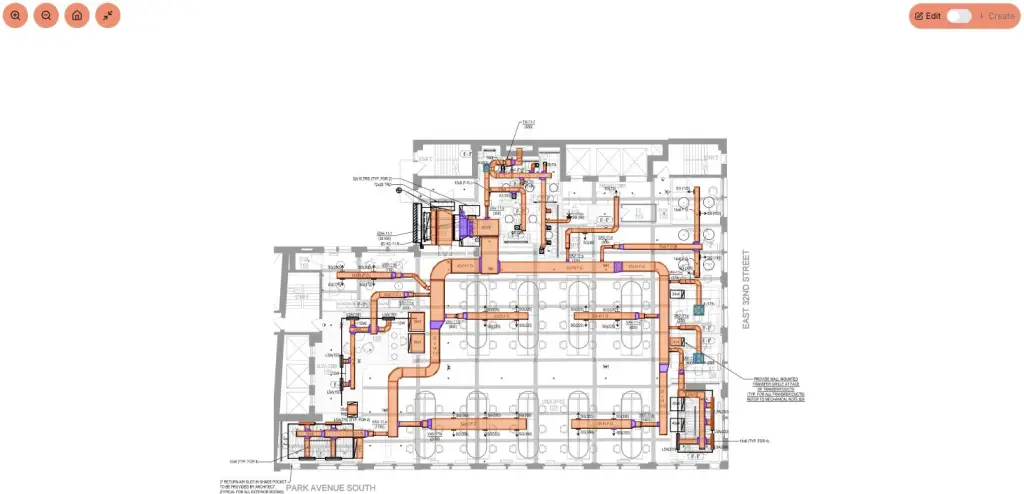
Actual SheetMetalAI workspace. Demo estimates are preliminary and require review.
HVAC Estimating Software for Contractors
Start With the Plan
Upload the mechanical PDF for the work you are bidding. AI identifies duct runs, fittings, sizes, and lengths to give your takeoff a first pass.
Check Your Scope
Review the highlighted drawing against the current scope and specification documents. If you use Claude, ask for source page references and check the original documents before making changes in SheetMetalAI.
Quote With Your Rates
Apply the material prices and labor assumptions your business uses. Export a priced PDF and review it before sending your bid.
CONNECT SHEETMETALAI TO

Ask What’s Ready. Find the Next Step.
Ask Claude which plans still need attention, what the latest quote totals, or which projects finished this month. The read-only connector uses your own Claude plan and links you back to SheetMetalAI for changes.
Built for Contractors Who Bid From Drawings
This workflow fits HVAC contractors quoting ductwork from mechanical plans, whether you prepare the takeoff yourself or share estimating work with a team. It brings the drawing, quantities, and pricing into one process you can review.
If your immediate need is service scheduling, equipment sizing, or replacement-system sales proposals, ask us about fit before subscribing. The workflow demonstrated here is mechanical-plan ductwork takeoff and estimating.
From a Busy Afternoon to a Repeatable Process
Start with one familiar project. Confirm the drawing revision, review the detected runs and fittings, check quantities, then apply current rates. A consistent review sequence makes it easier to see what still needs attention before the quote leaves your desk.
Try the software against a completed estimate you know well. Compare the same scope and track your own time from upload through review and export; results depend on the drawing and the job.
What You Still Bring to the Bid
You decide what is included. Review specifications, access, installation conditions, equipment, exclusions, and any other scope outside the demonstrated ductwork workflow. An exported estimate needs your judgment before it becomes a customer bid.
Bring a readable mechanical PDF, the matching specifications, and current shop rates. Use a familiar job so you can check both the takeoff and the spec findings during your trial.
Questions Before Your First Takeoff?
Can I use my own HVAC material and labor rates?
Yes. Use custom pricing tables and review the labor assumptions for your job. Confirm the current rates and project scope before exporting.
Will the AI results need checking?
Yes. Review the highlighted ductwork, dimensions, and quantities against the drawing. You can refine the takeoff before finalizing it.
Can a small contracting business use it?
Yes. Choose capacity around the number of plans you expect to estimate. Compare the current monthly and yearly options on the pricing page.
Build a Better Estimating Routine.
How to Create a Ductwork Takeoff From a PDF Plan
Learn a practical PDF ductwork takeoff process: confirm scope, review runs and fittings, organize quantities, and check the results before pricing.
Explore →How to Prepare HVAC Quotes Faster Without Skipping the Review
Improve your HVAC quoting workflow with a repeatable plan review, AI-assisted ductwork takeoffs, current rates, and a final quote checklist.
Explore →HVAC Takeoff vs. Estimating: What Happens at Each Stage?
Understand the difference between an HVAC takeoff, a priced estimate, and a customer quote—and how SheetMetalAI connects the ductwork workflow.
Explore →See Your Next Quote Take Shape.
Watch the real-project demo, then evaluate the full workflow with a mechanical PDF you know.