
FOR INDEPENDENT ESTIMATORS
More Focus on the Estimate.
Less Repetitive Counting.
Put more of your time into the estimate. SheetMetalAI provides an AI-assisted ductwork takeoff you can review, price, and export. Connect Claude to ask questions about finished takeoffs, quote totals, project status, and document details.
Watch the HVAC Takeoff Demo →American-built by HVAC contractors and industry veterans. For estimating professionals serving markets across the United States.
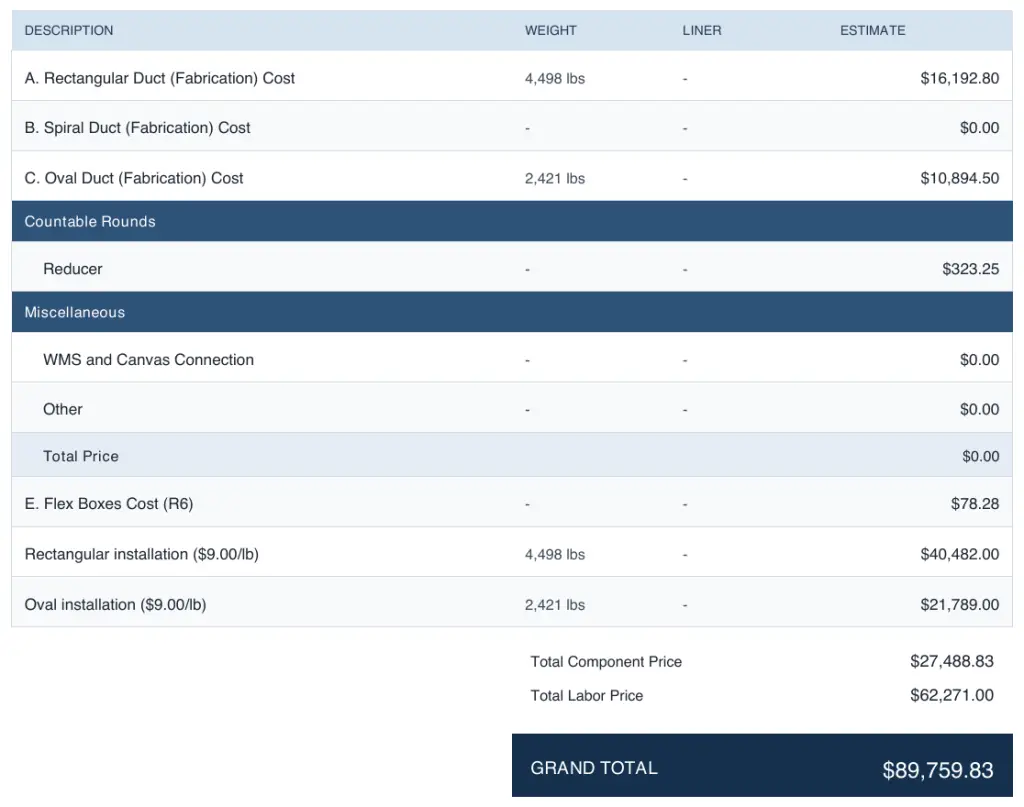
Actual SheetMetalAI workspace. Demo estimates are preliminary and require review.
HVAC Takeoff Software for Independent Estimators
A First Pass You Can See
Inspect highlighted ductwork on the drawing. Follow the detections and review the areas that require closer attention.
Project Rates You Control
Check the rates and assumptions appropriate to the business and job you are estimating. Avoid carrying the wrong pricing basis into a new quote.
A Clear Review Routine
Move through drawing, specification, quantity, and pricing review before exporting. When using the Claude connector, ask for document page references and check the original source.
CONNECT SHEETMETALAI TO

Find the Detail. Follow the Source.
Ask Claude to read uploaded specification text, quote relevant passages with page numbers, or inspect a full or zoomed drawing page. Review the answers and follow links back to SheetMetalAI for changes.
A Practical Fit for a Small Estimating Operation
You do not need a large estimating department to evaluate an AI-assisted workflow. Start with one mechanical PDF and work through the full sequence: upload, inspect, refine, price, and export.
Choose a plan based on your expected workload. Published plan capacities are approximate, and repeat processing can affect available capacity; check the current pricing details before subscribing.
Make the Trial a Useful Comparison
Use a familiar project with matching drawings and specifications. Compare the same revision and scope with a previous estimate. If you connect Claude, include time spent checking its answers and page references as well as reviewing and correcting the takeoff.
Look for a process you can repeat, not just a fast first result. Check crowded drawing areas, dimensions, material specifications, and the final PDF before judging the workflow.
Keep the Client’s Scope in View
A takeoff is one part of an estimate. Clarify inclusions, exclusions, and pricing assumptions with the business you are estimating for. Use the output as part of that reviewed package.
If your clients need a particular report or export format, confirm it with SheetMetalAI before committing. The public demo shows a priced PDF export.
Questions Before Your First Takeoff?
Can I try it on a completed project?
Yes. A familiar mechanical PDF and a previous estimate provide a useful basis for comparison during the trial.
Does AI replace my estimating review?
No. You review detections, quantities, specifications, and pricing. AI assists the first pass; you decide when the estimate is ready.
Where can I see a full example?
The demo follows one real mechanical plan through detected ductwork, component review, pricing, and a preliminary estimate.
Build a Better Estimating Routine.
How to Create a Ductwork Takeoff From a PDF Plan
Learn a practical PDF ductwork takeoff process: confirm scope, review runs and fittings, organize quantities, and check the results before pricing.
Explore →How to Prepare HVAC Quotes Faster Without Skipping the Review
Improve your HVAC quoting workflow with a repeatable plan review, AI-assisted ductwork takeoffs, current rates, and a final quote checklist.
Explore →HVAC Takeoff vs. Estimating: What Happens at Each Stage?
Understand the difference between an HVAC takeoff, a priced estimate, and a customer quote—and how SheetMetalAI connects the ductwork workflow.
Explore →See Your Next Quote Take Shape.
Watch the real-project demo, then evaluate the full workflow with a mechanical PDF you know.